
Project Description
When a parent or grandparent lives on their own, one question sits at the back of your mind all day: are they OK right now? You can call, but you can’t call every hour. You can buy a smartwatch, but it ends up on the nightstand. You can fit a camera, but nobody wants to be watched in their own bedroom.
I wanted something in between: a small box in the room that quietly notices heart rate, breathing, presence and sleep, and only speaks up when something looks wrong. No wearable to forget, nothing to charge, no images and no audio. Just numbers.
So I built it. It is called Hearthbeat. It turns a small 60 GHz radar kit into a contact-free room monitor with a friendly dashboard in 9 languages and optional Telegram alerts. It is open source under the MIT licence, and you can grab it from GitHub.
Why radar, not a camera or a wearable
Every option for checking on an older relative comes with a catch:
- Wearables only work while they are worn and charged, which is exactly when you don’t need them.
- Cameras answer the question, but they feel like an intrusion, and most people would rather not be filmed getting out of bed.
- Medical monitors are expensive and built for hospitals, not for a spare bedroom.
A 60 GHz millimetre-wave radar sidesteps all three. It picks up the tiny movement of the chest as someone breathes and as their heart beats, even through a duvet. It doesn’t record pictures or sound, so there is nothing private to leak. It plugs into the wall and keeps going.
What Hearthbeat does
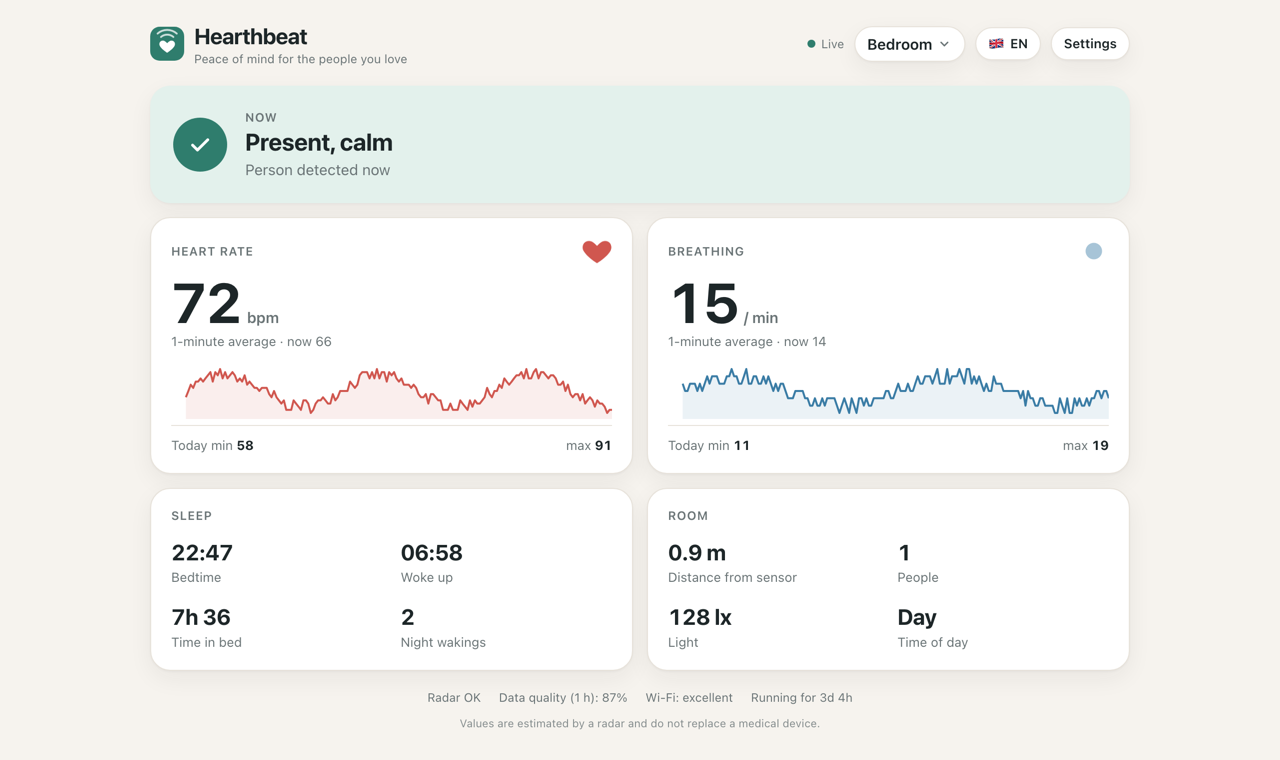
- Vital signs: live heart rate and breathing rate, plus 1-minute averages that smooth out the jumps, and today’s minimum and maximum, reset at midnight.
- A plain-language status: Present, calm, Present, moving, In bed, resting, Visitor present, Too far for vital signs or Nobody in the room. You don’t need to know what a normal breathing rate is to read it.
- Alerts: fast or slow breathing, high or low heart rate, nobody seen for too long and radar not responding. Every threshold can be changed from the Settings page.
- Sleep: bedtime and wake-up time, worked out from presence, distance and darkness, plus time in bed and how many times they got up in the night.
- A status light: the kit’s LED glows green when someone is present, yellow when they are too far or have a visitor, red for an alert, and stays off when the room is empty.
- Several rooms: one sensor per room, with a room switcher in the header and rooms you can rename from the app.
Built to avoid false alarms
The hardest part wasn’t reading the radar. It was knowing when not to believe it. Radar vital signs are only reliable when the person is still and close to the sensor. Someone walking around, talking on the phone or typing at a desk makes the breathing number shoot up, and an alarm that cries wolf gets switched off within a week.
So Hearthbeat is deliberately cautious:
- Stillness first: vital signs only count once the person has been still for 2 minutes, or is in bed. Until then the dashboard says Present, moving instead of raising an alarm.
- Alerts must last: heart-rate and breathing alerts only fire after the condition has lasted 1 minute.
- Visitors are ignored: readings are skipped while a second person is in the room, or while the person is too far from the sensor.
- A data quality score: the dashboard shows the share of the last hour with a usable reading, so you know when to trust a strange value and when to shrug.
Alerts on your phone, without a hub
A dashboard is only useful if someone is looking at it. Hearthbeat can message you, or a family group, on Telegram directly from the sensor. There is no hub, no cloud account and no subscription.
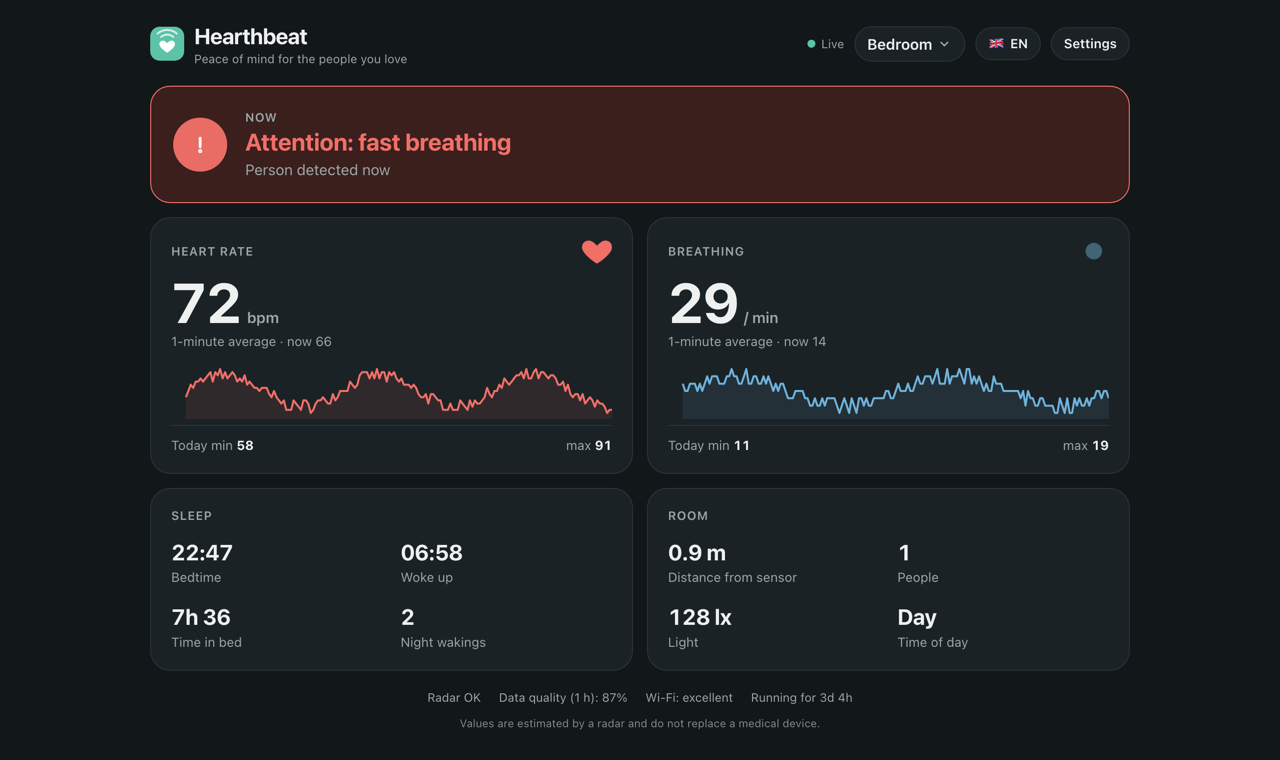
- Alert started: 🔴 Bedroom: Fast breathing, with heart rate, breathing and the time.
- Alert cleared: ✅ Bedroom: alert cleared · Present, calm.
- Sensor online: sent after every start-up, which tells you there was a power or internet cut.
- Morning summary: ☀️ bedtime, wake-up time, time in bed, night wakings and the day’s ranges, at the hour you choose.
You can also chat with the sensor. Send /status, /sleep or /today and it replies within about 10 seconds. It only answers the chat you configured and ignores everyone else.
A dashboard the whole family can read
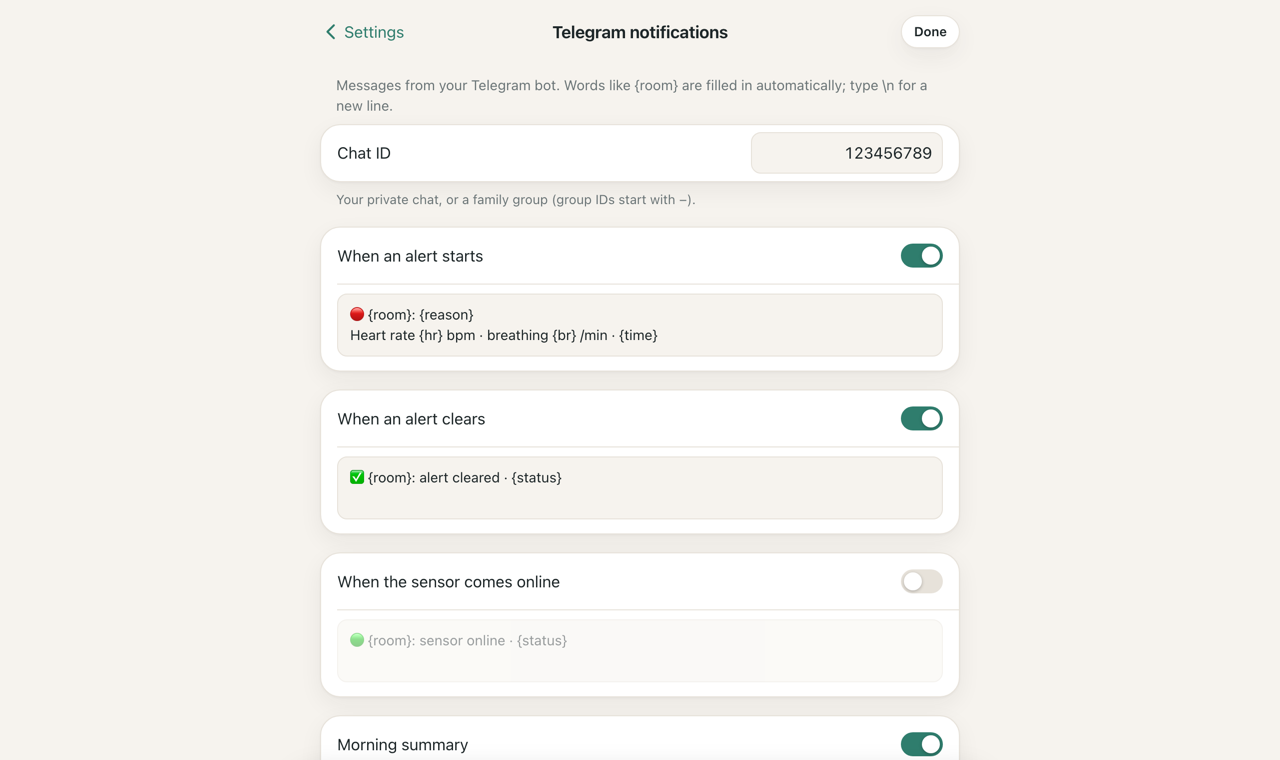
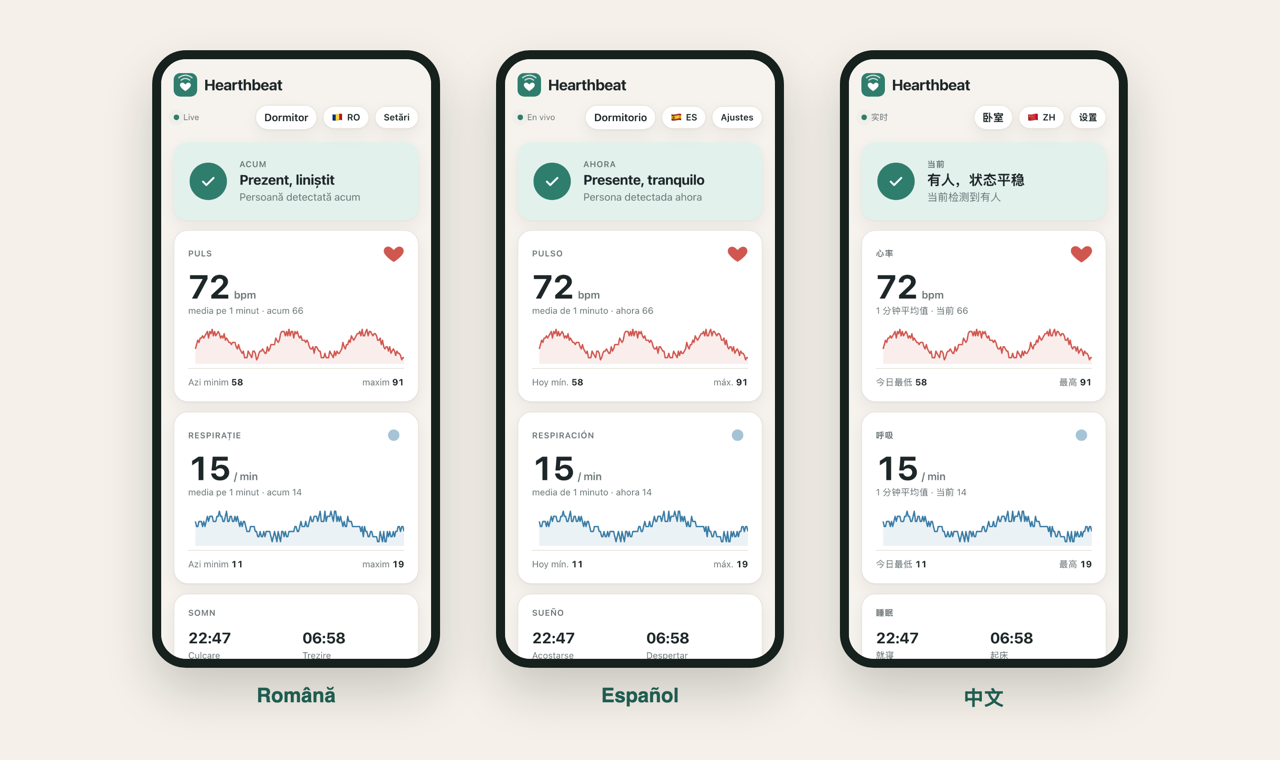
The person checking in is often not the technical one in the family. So the dashboard is calm, phone-first and served by the sensor itself: no app to install and no account to create. It speaks English, Română, 中文, हिन्दी, Español, Français, Português, Русский and Deutsch, follows the browser’s language automatically and has light and dark modes.
How it works under the hood
The hardware
Each room uses a Seeed Studio MR60BHA2 kit: a XIAO ESP32-C6 board, the MR60BHA2 60 GHz breathing and heartbeat radar, a BH1750 light sensor and an RGB LED in one small case. Add a decent 5 V USB power adapter and 2.4 GHz Wi-Fi and that is the whole shopping list.
The firmware
The firmware is ESPHome YAML. One shared file holds everything, and each room gets a tiny file with just its name, room label and time zone. Small C++ blocks inside handle the averages, alerts, sleep detection, data quality and the LED. After the first USB install, every update goes over Wi-Fi.
The dashboard
The dashboard is plain HTML, CSS and JavaScript with no build step and no dependencies. It is embedded into the firmware and fed by the sensor’s live event stream. Settings are saved through ESPHome’s REST API, so they survive restarts.
Home Assistant, if you want it
An encrypted Home Assistant API is built in. Add Home Assistant at the home and you get phone notifications, long-term history graphs, remote access through Home Assistant Cloud or Tailscale, and rules like “nobody seen anywhere by 10:00”.
Private by design
- No images, no audio: the radar only produces numbers.
- No cloud: the dashboard runs on the sensor on your home network. Nothing is uploaded unless you switch on Telegram or connect Home Assistant.
- Secrets stay local: Wi-Fi details, passwords and the Telegram bot token live in a
secrets.yamlfile that never leaves your computer. - Not on the open internet: the dashboard is meant for the home network. For access from abroad, Hearthbeat points you to Home Assistant with Tailscale or Home Assistant Cloud, not port forwarding.
How to try it
You need a Seeed MR60BHA2 kit for each room, a USB-C cable that carries data and a computer with Python 3.10 or newer.
- Install ESPHome and clone the repository:
pip install esphome git clone https://github.com/costibotez/hearthbeat.git cd hearthbeat - Copy
secrets.example.yamltosecrets.yamland fill in your Wi-Fi and passwords. - Copy
example-room.yamlto a file per room, for examplehearthbeat-bedroom.yaml, and set the room name and time zone. - Plug in the kit and run
esphome run hearthbeat-bedroom.yaml. The first build takes 5 to 10 minutes. - Open
http://hearthbeat-bedroom.localand log in.
Mount the sensor 1 to 1.5 m from the bed or armchair, at chest height and facing the person. Readings settle after about 60 seconds of stillness. The README covers everything else, including Wi-Fi installs, Telegram set-up and troubleshooting.
No hardware yet? Serve the repository with python3 -m http.server 8000 and open http://localhost:8000/preview/ to play with the dashboard on simulated data. That is how every screenshot in this post was made.
What I learned building it
- Knowing when not to trust a reading matters more than the reading: the stillness rule, the 1-minute delay and the data quality score did more for usefulness than any tweak to the radar itself.
- Plain language beats numbers: Present, calm is more reassuring to a worried relative than 72 bpm, 15 breaths per minute. The numbers are still there for anyone who wants them.
- Notifications need to be editable: families want messages in their own language and their own words, so every Telegram message is a template you can rewrite from the dashboard.
- No build step pays off on tiny hardware: a dependency-free dashboard fits on the sensor and keeps working years from now.
What’s next
- A Home Assistant blueprint for alerts across all rooms
- Room position on a floor plan with an HLK-LD2450 tracking radar
- Fall detection for bathrooms with the Seeed MR60FDA2
- Temperature and humidity, a help button and an Arabic translation
An important note
Hearthbeat is a peace-of-mind tool, not a medical device. Radar readings are estimates, they only work when the person is still and close to the sensor, and they need the home’s power and internet to send alerts. It must never replace professional care, a fall alarm or an emergency plan.
Conclusion
Checking on someone you love shouldn’t mean choosing between a camera they hate and a watch they forget. A small radar in the corner of the room, a calm page that says Present, calm and a message on your phone only when something changes is often all the reassurance you need.
Hearthbeat is free and open source on GitHub. If it helps your family, a star on the repo is always appreciated, and ideas and pull requests are very welcome.
Have an idea for a connected device, a dashboard or a small tool that would make your business or your family’s life easier? Get in touch and we can talk it through. The most relevant starting points are usually SaaS and app development and custom plugin development.